





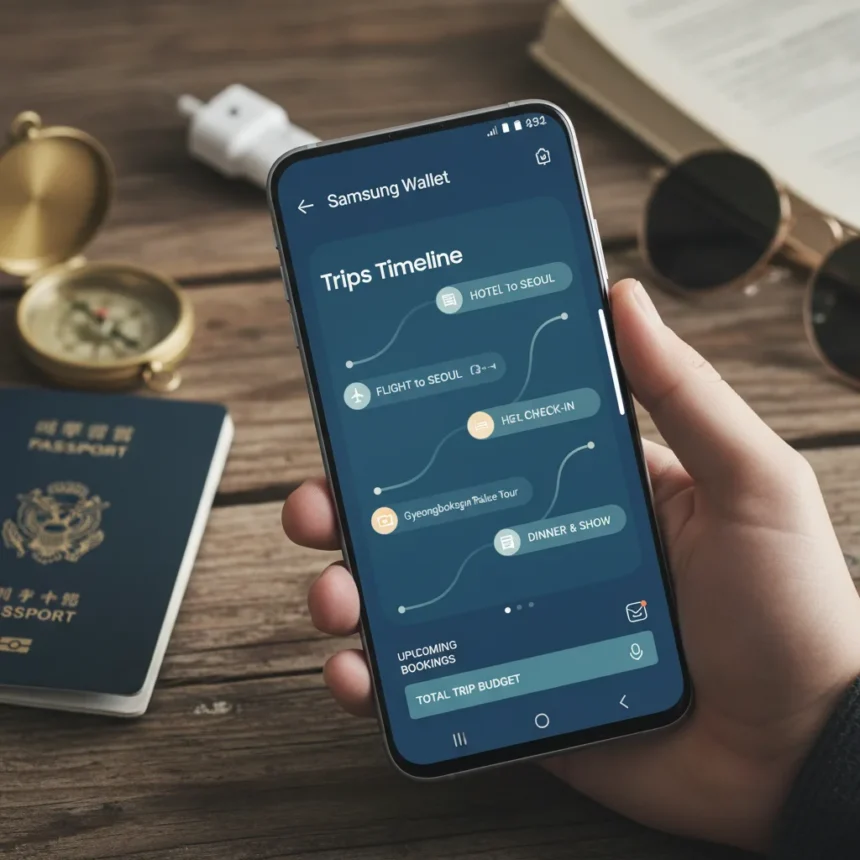
Samsung Wallet Trips timeline is a new organizational feature within Samsung’s mobile wallet application designed to consolidate travel itineraries and booking information in a single, accessible location. The feature streamlines travel planning by bringing together flight confirmations, hotel reservations, and other trip-related documents into a unified timeline view.
Key Takeaways
- Samsung Wallet now includes a dedicated Trips timeline for organizing travel itineraries
- The feature consolidates flight confirmations, hotel bookings, and travel documents in one place
- Users can view their entire trip schedule at a glance without juggling multiple apps
- The timeline format presents trip information chronologically for easy reference
- Samsung Wallet Trips timeline reduces the need to search through email and separate travel apps
What Samsung Wallet Trips Timeline Does
The Samsung Wallet Trips timeline function organizes all travel-related information into a chronological view that displays your entire journey from departure to return. Rather than scattered across emails, confirmation texts, and separate travel apps, your reservations appear in one organized feed. This approach eliminates the friction of searching through multiple platforms when you need to confirm a flight time or hotel address during your trip.
The timeline presents bookings in the order they occur, making it simple to see what comes next in your itinerary. Whether you’re checking in at the airport, arriving at your hotel, or planning ground transportation, the information you need appears exactly when you need it. This chronological organization reduces cognitive load during travel, when you’re already managing luggage, navigating airports, and adjusting to new time zones.
How Samsung Wallet Trips Timeline Compares to Alternatives
Travel planning tools have evolved significantly across the mobile ecosystem. Google Wallet offers similar document consolidation for boarding passes and reservations, while dedicated travel apps like TripIt and Hopper provide itinerary management with additional features like price tracking and flight alerts. Samsung‘s approach integrates the timeline directly into its existing Wallet application, leveraging the same interface users already access for payments and ID cards.


The advantage of embedding trip organization into Samsung Wallet is convenience through consolidation. Users don’t need to install another app or switch between platforms to view their travel schedule. For Samsung device owners who already rely on Samsung Wallet for payments and identification, adding trip management feels like a natural extension rather than requiring adoption of a new service.
Why Samsung Wallet Trips Timeline Matters Now
Travel booking complexity has increased as consumers split reservations across multiple platforms. Airlines sell through their own apps, hotels through booking aggregators, and ground transportation through ride-sharing services. A unified timeline within Samsung Wallet addresses this fragmentation by creating a single source of truth for your trip. The feature acknowledges that modern travel requires managing information from dozens of sources, and it solves that problem by bringing everything into one view.



For Samsung users, this represents a meaningful quality-of-life improvement during travel. The timeline reduces the stress of wondering whether you’ve checked everything, forgotten a confirmation, or missed an important booking detail. By presenting your entire trip in chronological order, Samsung Wallet Trips timeline lets you focus on the actual experience of traveling rather than the logistics of managing reservations.
Does Samsung Wallet Trips timeline work with all booking platforms?
Samsung Wallet Trips timeline integrates with common booking platforms and email confirmations. The feature automatically recognizes travel-related emails and documents, pulling relevant information into the timeline view. Compatibility depends on whether your bookings are made through major airlines, hotel chains, and travel booking services that Samsung Wallet supports.
Can you edit or customize your trip timeline in Samsung Wallet?
The timeline displays your bookings in chronological order based on the information from your confirmations. While the specific customization options available within Samsung Wallet Trips timeline depend on the feature’s implementation, the primary function is to organize existing reservations rather than create new bookings directly within the app.
Is Samsung Wallet Trips timeline available globally?
Samsung Wallet Trips timeline availability depends on your device model and regional Samsung Wallet version. The feature rolls out to compatible Samsung devices over time, so not all users may have immediate access. Check your Samsung Wallet app for the latest features available in your region.



Samsung Wallet Trips timeline represents a practical response to travel complexity. By consolidating itineraries into a single, chronological view, the feature removes friction from trip planning and execution. For Samsung users who travel regularly, this addition transforms Wallet from a payment tool into a genuine travel companion, handling the logistical burden so you can actually enjoy your trip.
This article was written with AI assistance and editorially reviewed.
Source: Android Central