





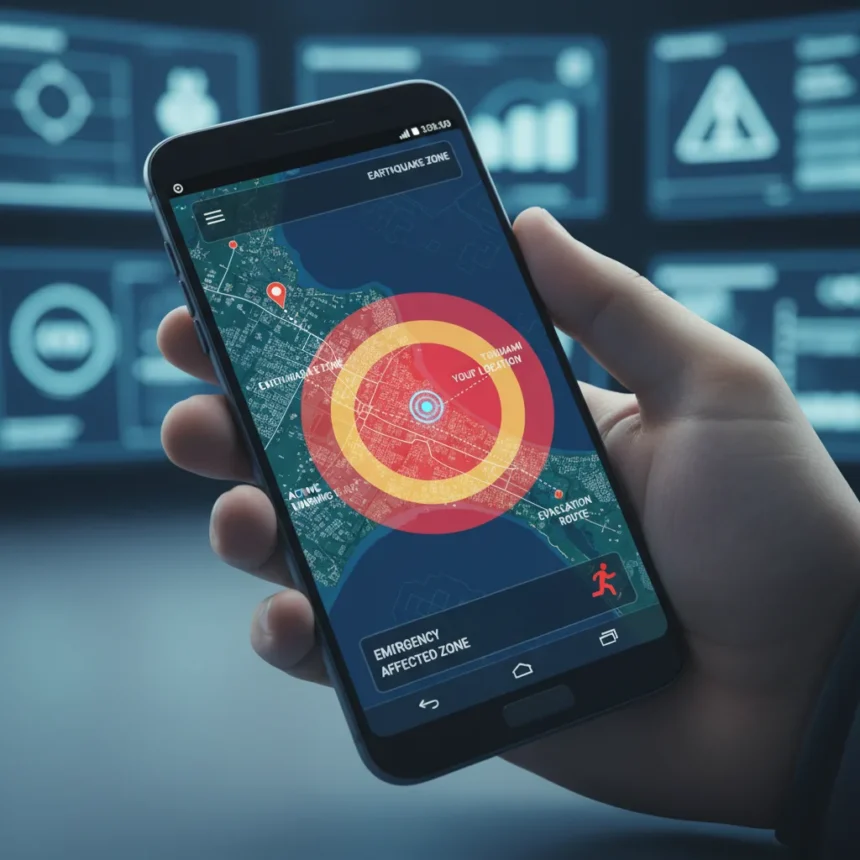
Wireless Emergency Alerts on Android just gained a critical upgrade: a live map view that displays the affected area and your exact location directly within the alert notification. No longer are you squinting at text descriptions trying to figure out if an earthquake or evacuation zone applies to you. Google added this feature via Google Play services version 26.12 or later, announced in the March 2026 Google System Release Notes published March 30, 2026.
Key Takeaways
- Wireless Emergency Alerts now include a map showing the emergency zone and your current location within the notification itself
- Feature rolls out gradually via Google Play services v26.12+, starting March 2026
- Previously, emergency alerts were text-only, forcing users to interpret descriptions manually
- Android’s safety ecosystem also includes Earthquake Alerts, Emergency Location Service, and Car Crash Detection on Pixel
- Update is free and requires no separate app installation
Why the Wireless Emergency Alerts map matters right now
In an emergency, every second counts. Before this update, Wireless Emergency Alerts delivered only text notifications describing affected areas—words like “evacuation zone” or “tsunami warning” that forced users to mentally map their position relative to the threat. The new map view eliminates that cognitive step. You see the danger zone and your location simultaneously, making immediate decisions faster and clearer. During an earthquake, tsunami, or evacuation order, clarity is survival.
Google’s timing reflects a real gap in mobile emergency infrastructure. Existing WEA systems have protected millions, but the text-only format creates friction precisely when friction is dangerous. A map removes ambiguity. According to the March 2026 release notes, this enhancement applies to all Wireless Emergency Alert types—earthquakes, tsunamis, evacuations, and other FEMA-coordinated warnings.
How the Wireless Emergency Alerts map compares to older Android safety features
Android has offered emergency features for years, but they operated in silos. Earthquake Alerts alert you seconds before shaking begins, giving you time to drop and cover. Emergency Location Service automatically shares your coordinates when you call or text 911 or other emergency numbers, helping responders find you faster. Car Crash Detection on Pixel phones detects collisions and can alert emergency contacts. The new Wireless Emergency Alerts map integrates geographic awareness directly into the alert itself, creating a unified picture in the moment of crisis.


Unlike these point-in-time features, the map view is passive—it arrives unbidden when an emergency is declared in your area. You don’t need to open an app, enable a setting, or navigate menus. The information appears in your notification shade. This passive delivery is crucial because it reaches people who might not know to activate safety features during panic.
Rolling out gradually, but what you need to know
The update requires Google Play services version 26.12 or later. Most Android devices receive Play services updates automatically, but rollout is gradual—your device may take weeks to receive the new version. Some related safety features require Android 9 or later. Check your Google Play Services version in Settings > Apps > Google Play Services if you want to verify you have the update.



The map view works without requiring a separate emergency app or additional configuration. Once your device receives Google Play services v26.12+, Wireless Emergency Alerts will automatically display the map when your carrier or FEMA issues an alert for your area. There is no opt-in required, and there is no cost—this is a free platform enhancement included with the Google Play services update.
Does Wireless Emergency Alerts map work on all Android phones?
The feature rolls out via Google Play services, which means it reaches most Android devices running Android 9 and later. However, rollout is staggered, so not all devices receive the update simultaneously. Your phone may not have it yet even if it meets the requirements. Check your Play Services version in Settings to see if you have v26.12 or later.
Can you turn off the Wireless Emergency Alerts map notifications?
Wireless Emergency Alerts are federally mandated emergency notifications, meaning you cannot disable them entirely in most jurisdictions. However, you can adjust alert settings in your phone’s emergency settings menu to control tone, vibration, or display behavior. Check your device’s Settings > Apps & Notifications > Emergency Alerts or similar path depending on your manufacturer’s interface.
How does this compare to other countries’ emergency alert systems?
The United States’ Wireless Emergency Alerts system is operated by FEMA and carriers, making it one of the most established emergency broadcast networks globally. Other countries use similar systems (Japan’s NHK system, South Korea’s wireless emergency alerts, the UK’s Emergency Alerts), but most still rely on text-based or voice notifications. Google’s map enhancement puts Android ahead of many regional systems in terms of visual clarity during crises.


If you live in a region prone to earthquakes, tsunamis, or severe weather, the new Wireless Emergency Alerts map is not a luxury—it is a practical safety upgrade that clarifies risk in real time. The feature arrives free and automatic, requiring nothing from you except keeping Google Play services updated. That simplicity is the point. In emergencies, the best safety feature is the one that works without thinking.
Where to Buy
Samsung Galaxy S26 | Samsung Galaxy S26 Plus | Samsung Galaxy S26 Ultra | Google Pixel 10 | Google Pixel 10a
Edited by the All Things Geek team.
Source: TechRadar